Tuesday, April 5, 2016

Windows Form - Using user controls

To separate UI with minimize coding effort, solve smaller problem or reuse purpose, we usually use sub-form or user control. In this topic, I will introduce how to call multi User Controls from parent form. With this idea you can make design UI for many kind of simple apps to enterprise apps. Let's get started:
      1.     Create new project:
-          Create new project by select: File > New > Project…
-          Enter the project name and click OK
      2.       Add controls
-          In Toolbox, find MenuStrip control, then add to form.
-          Enter some StripMenuItem, look like:


-          Rename all StripMenuItem like: smiControl01, smiControl02, smiControl03
-          Then, in Toolbox, find Panel control, add to form. Set this panel Dock property is Fill or do like this:

-          I named this panel is pnlMain
      4.       Add UserControls
-          In Solution Explorer, right click on project name, select Add > New Item…
-          Select User Control, named it and click Add

-          Do the same for 3 User Controls
       5.       Show/Add UserControls to form
-          Now, let’s do some coding. In the backend code of the form, create add user control to panel function
private void AddUserControlToPanel(Control ctrl)
{
    //Clear all old control
    pnlMain.Controls.Clear();
    //Add the new control
    pnlMain.Controls.Add(ctrl);
    //Make control fill in the panel
    ctrl.Dock = DockStyle.Fill;
}
-          In each click event of StripMenuItem, call that function with parameter is the relevant control
private void smiControl01_Click(object sender, EventArgs e)
{
    AddUserControlToPanel(new MyControl01());
}
private void smiControl02_Click(object sender, EventArgs e)
{
    AddUserControlToPanel(new MyControl02());
}
private void smiControl03_Click(object sender, EventArgs e)
{
    AddUserControlToPanel(new MyControl03());
}
-          You can also can call a default control when load form by call function AddUserControlToPanel in form constructor
-          Note that, each user control can treat like a form, so you should do some design user controls before run check our result.
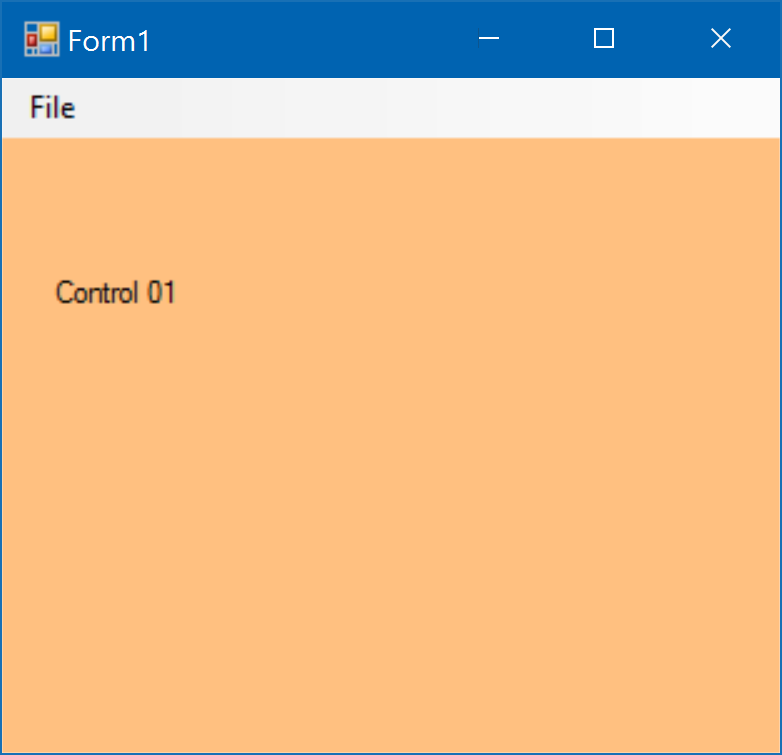
  

      6.       Resize form
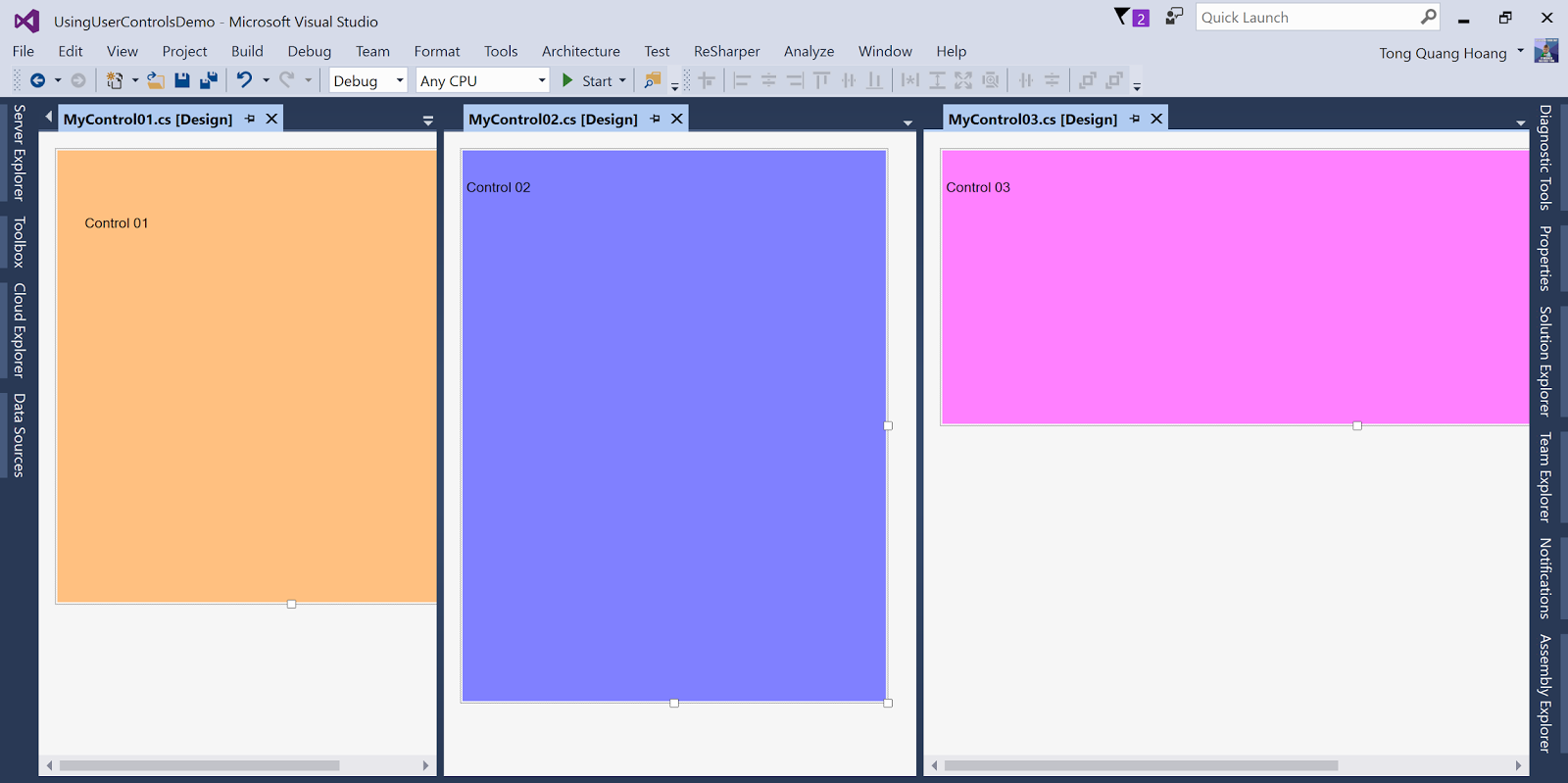
-          You may wanna change the size of form when control added to make User Control appear fully
-          Edit the AddUserControlToPanel function
private void AddUserControlToPanel(Control ctrl)
{
    //Clear all old control
    pnlMain.Controls.Clear();
    //Add the new control
    pnlMain.Controls.Add(ctrl);
    //Make control fill in the panel
    //ctrl.Dock = DockStyle.Fill;
    //Change size form
    this.ClientSize = new Size(ctrl.Width, ctrl.Height + menuStrip1.Height);
}
-          Make controls are different size and color then run project 
Thank you for reading.

Wednesday, March 30, 2016

Xamarin.Forms validation using Behaviors

I''m starting with Xamarin not long time ago. Facing with validation problem, I found very useful class Behaviors. It's not all about validation but also can do more cool things with this class. In this post, I will focus on my way to use it in validation for client side.

The first thing, maybe you should look at this post:
https://blog.xamarin.com/behaviors-in-xamarin-forms/

Base on this, I do some changing code.
 - In the real thing, you may like to validate many condition for one controls (such as: Require and email format, require and maxlength...). To make it easier I create validation class to validate for each control type, instead of each rule. Let's see the code is changed:


   1:  
   3:  using Xamarin.Forms;
   4:   
   5:  namespace MyProject.Client.Framework.Validators
   6:  {
   7:      public class EntryValidatorBehavior : Behavior<Entry>
   8:      {
   9:          #region Properties
  10:   
  11:          //Result Boolean
  12:          private static readonly BindablePropertyKey IsValidPropertyKey = BindableProperty.CreateReadOnly("IsValid",
  13:              typeof(bool), typeof(EntryValidatorBehavior), false);
  14:   
  15:          public static readonly BindableProperty IsValidProperty = IsValidPropertyKey.BindableProperty;
  16:   
  17:          public bool IsValid
  18:          {
  19:              get { return (bool)GetValue(IsValidProperty); }
  20:              private set { SetValue(IsValidPropertyKey, value); }
  21:          }
  22:   
  23:          //Result message
  24:          public static readonly BindableProperty MessageProperty = BindableProperty.Create("Message",
  25:              typeof(string), typeof(EntryValidatorBehavior), string.Empty);
  26:   
  27:          public string Message
  28:          {
  29:              get { return (string)GetValue(MessageProperty); }
  30:              private set { SetValue(MessageProperty, value); }
  31:          }
  32:   
  33:          //Is check empty
  34:          public static BindableProperty IsCheckEmptyProperty = BindableProperty.Create("IsCheckEmpty",
  35:              typeof(bool), typeof(EntryValidatorBehavior), false);
  36:   
  37:          public bool IsCheckEmpty
  38:          {
  39:              get { return (bool)GetValue(IsCheckEmptyProperty); }
  40:              set { SetValue(IsCheckEmptyProperty, value); }
  41:          }
  42:   
  43:          //Is check email
  44:          public static BindableProperty IsCheckEmailProperty = BindableProperty.Create("IsCheckEmail",
  45:              typeof(bool), typeof(EntryValidatorBehavior), false);
  46:   
  47:          public bool IsCheckEmail
  48:          {
  49:              get { return (bool)GetValue(IsCheckEmailProperty); }
  50:              set { SetValue(IsCheckEmailProperty, value); }
  51:          }
  52:   
  53:          #endregion Properties
  54:   
  55:          protected override void OnAttachedTo(Entry bindable)
  56:          {
  57:              bindable.TextChanged += HandleTextChanged;
  58:          }
  59:   
  60:          private void HandleTextChanged(object sender, TextChangedEventArgs e)
  61:          {
  62:              if (IsCheckEmpty)
  63:              {
  64:                  IsValid = ValidatorsFactory.IsValidEmpty(e.NewTextValue);
  65:                  Message = Messages.FieldCannotBlank;
  66:                  if (!IsValid)
  67:                  {
  68:                      ((Entry)sender).TextColor = Color.Red;
  69:                      return;
  70:                  }
  71:              }
  72:              if (IsCheckEmail)
  73:              {
  74:                  IsValid = ValidatorsFactory.IsValidEmail(e.NewTextValue);
  75:                  Message = Messages.EmailIncorrectFormat;
  76:                  if (!IsValid)
  77:                  {
  78:                      ((Entry)sender).TextColor = Color.Red;
  79:                      return;
  80:                  }
  81:              }
  82:              //TODO: add more validation
  83:   
  84:              //Default
  85:              IsValid = true;
  86:              Message = string.Empty;
  87:              ((Entry)sender).TextColor = AppColors.EntryTextColor;
  88:          }
  89:   
  90:          protected override void OnDetachingFrom(Entry bindable)
  91:          {
  92:              bindable.TextChanged -= HandleTextChanged;
  93:          }
  94:      }
  95:  }

 * Note: It's contain some constants and reference to my source code so if you just copy&paste, it will not work, let's try to understand it.

Some thing changed here:
 - The first thing I add Message property to provide different validate message of each error for client to display. You see I set value for the Message in HandleTextChanged method.
 - Each kind of validate will have an option to validate it or not. In my code you will see: IsCheckEmpty, IsCheckEmail that you can control what you wanna validate for Entry or not.
 - The HandleTextChanged method ( or handle another event) will do validate and set value for IsValid and Message. You may wonder what is ValidatorsFactory, that the logic of validate I moved to other class call ValidatorsFactory.

Let's see how that factory work:


   1:  using System;
   2:  using System.Text.RegularExpressions;
   3:   
   4:  namespace MyProject.Client.Framework.Validators
   5:  {
   6:      public static class ValidatorsFactory
   7:      {
   8:          private const string EmailRegex =
   9:              @"^(?("")("".+?(?<!\\)""@)|(([0-9a-z]((\.(?!\.))|[-!#\$%&'\*\+/=\?\^`\{\}\|~\w])*)(?<=[0-9a-z])@))" +
  10:              @"(?(\[)(\[(\d{1,3}\.){3}\d{1,3}\])|(([0-9a-z][-\w]*[0-9a-z]*\.)+[a-z0-9][\-a-z0-9]{0,22}[a-z0-9]))$";
  11:   
  12:          public static bool IsValidEmail(string input)
  13:          {
  14:              return (Regex.IsMatch(input, EmailRegex, RegexOptions.IgnoreCase, TimeSpan.FromMilliseconds(250)));
  15:          }
  16:   
  17:          public static bool IsValidEmpty(string input)
  18:          {
  19:              return !string.IsNullOrWhiteSpace(input);
  20:          }
  21:   
  22:          public static bool IsValidMaxlength(string input, int maxlength)
  23:          {
  24:              return input.Length <= maxlength;
  25:          }
  26:   
  27:          //TODO: add more validation
  28:      }
  29:  }
That easy to understand, right? Those static methods will return the valid input or not.

Then, how to use. This example I used in sign-in page:


   1:   <controls:ExtendedEntry Grid.Row="0" Keyboard="Email" Text="{Binding Model.Email, Mode=OneWayToSource}" Placeholder="Email">
   2:          <Entry.Behaviors>
   3:            <validators:EntryValidatorBehavior IsCheckEmpty="True" IsCheckEmail="True" x:Name="EmailValidator"/>
   4:          </Entry.Behaviors>
   5:        </controls:ExtendedEntry>
   6:        <Label Grid.Row="1" TextColor="{x:Static styles:AppColors.LabelErrorTextColor}" 
   7:               Text="{Binding Source={x:Reference EmailValidator}, Path=Message}" 
   8:               VerticalOptions="Start" HorizontalOptions="Start"
   9:               IsVisible="{Binding Source={x:Reference EmailValidator}, Path=IsValid,Converter={StaticResource InvertBoolConverter}}"/>
Here is it:

Thank you for reading.

Edit: Please see the updated version here: http://blog.zquanghoangz.com/?p=139

Sunday, January 24, 2016

Basic SharePoint 2013 tips & tricks collection - Part 1

I'm starting with SharePoint in end of 2015, then also want to write blog again, to collect all my work experience with SharePoint, probably with SharePoint 2013 this time.

I know all that tips tricks might be easy to find over the internet, but I will try to write them again with describe specific situation I meet. And will update time by time.

1. Change host-named for site collection in SharePoint 2013
That was painful lesson for me when I blow away all data of a site collection in production server (luckily it's not go live yet )
http://zquanghoangz.blogspot.sg/2016/01/change-host-named-for-site-collection.html

2. To login with different user
I don't know why, this thing is to hard in SharePoint, but in situation I run the UAT test, then should login with many accounts with different role. That is quick way to do:
http://<site URL>/_layouts/closeConnection.aspx?loginasanotheruser=true

3. Disable Loop Back Check in SharePoint 2013
It's not really SharePoint issue, that is Windows issue, then you can get Solution for that in Microsoft in this link:
https://support.microsoft.com/en-us/kb/896861

In quick, you can see (not recommended but I tried):

Run this power shell command
New-ItemProperty HKLM:\System\CurrentControlSet\Control\Lsa -Name "DisableLoopbackCheck" -value "1" -PropertyType dword

You can also navigate to HKEY_LOCAL_MACHINE\SYSTEM\CurrentControlSet\Control\Lsa in registry and create the dword32 for DisableLoopbackCheck, modify the value to 1.

Thank you.
will update more...

Tuesday, January 19, 2016

Change host-named for site collection in SharePoint 2013

Today I'm facing with problem to change host-named of existing site collection to another. It takes me a lot of search with some issues in each steps. So I think that will be useful if I summarize something here to save my time in future and your time also.

In short, what I do exactly is:
 - Create new site collection with new domain
 - Deploy the website on it
 - Backup old site collection, then Restore on the new site collection

Before the begin, lets define some addresses I will use in detail steps.
WebCollectionAddr : that's the web collection address, ex: sharepoint-123:8888
OldSiteCollectionAddr : that's the old site collection address, ex: sharepoint-123:8888/sites/mysite
NewSiteCollectionAddr : that's the new site collection address, ex: mysite.com
I will use those above sites to demonstrate in each steps, so you should change it by your own sites.
Now we go in detail each step:

1. Create IIS binding for domain: 
 - Go to IIS Manager, click on your site under 'Sites'. You can see 'Bindings...' somewhere in the right content, click on.
 - Click 'Add'to add new and follow the step to create new site binding.

2. Create new site collection
 - Use sharepoint Powershell:
New-SPSite ‘http://NewSiteCollectionAddr/’ -HostHeaderWebApplication ‘http://WebCollectionAddr’ -Name ‘My site’ -Description ‘This is my site’ -OwnerAlias ‘domain\account’ -language 1033 -Template ‘STS#0’

 - Note: domain\account that account to login and have permission to create site collection

3. Check site is created
 - Use sharepoint Powershell:
Get-SPSite 'http://NewSiteCollectionAddr/'

4. Deploy the web site
 - Deploy the web site in the new site collection

5. Backup the old site collection
 - Use sharepoint Powershell:
Backup-SPSite 'http://OldSiteCollectionAddr/' -Path 'D:\SPBackup\bk_name.bak'

6. Delete old site collection
 - Go to sharepoint Central Administration > Application Management > Delete a Site collection
 - Select the old site collection then delete it

7. Remove the old site collection from recycle bin
 - After deleted, the site collection go to recycle bin, to restore data to new site collection, you should completely delete old site collection
 - To do that, you should get site id of old site collection from database 'AllSites' table
 - Use sharepoint Powershell:
Remove-SPDeletedSite -Identity 'GUID_SITE_ID'
 - Note: GUID_SITE_ID will be changed by site id, usually is guid text

8. Run Gradual Site Deletion Timer Job
 - Go to Central Administration > Monitoring > Review Job Definations.
 - Click on job name: Gradual Site Delete. Click on Run now.

9. Restore to new site
 - Use sharepoint Powershell:
Restore-SPSite 'http://NewSiteCollectionAddr/' -Path 'D:\SPBackup\bk_name.bak' -HostHeaderWebApplication ‘http://WebCollectionAddr’ -Force

Follow those steps, if you have any futher issue please comment in this blog.

Thank you.

Saturday, April 18, 2015

Time management and discipline are the things I should always care about.

It's exactly my problem now. With a few days left I must be done a lot of studies. I have a lot of work plus study technical and have to take 2 certifications by next week. HOW the hell can I arrange time to do all these things.

That is my issue right now, but what really make me in the bad emotion is what did I do when I'm having nothing happen at all? The risk when I waste my time to do something no value at all now become a big issue.

So now, I should come back to time management and discipline problem. I should careful about what I spend time for and should thinking next some steps in future.

Here is crazy list, I wanna memory it here;
1. Pluralsight: Building HTML5 and JS apps with MVVM and knockout JS
2. Knockout JS
3.Durandal JS
4 UT for JS: qunit
5. LESS CSS
6. Sencha Tough JS
7. Get 2 Microsoft Certifications: 70-483, 70-484
8. Wordpress

Saturday, July 28, 2012

Living energy

Hi, everyone.
Today I feel like a dancer. I want to dance some very simple steps. When I'm a student (like you), I'm always being shy, I'm afraid people laugh me when I do crazy things (I mean dancing). Now, I'm not.
Let's dance my friends.
http://www.youtube.com/watch?v=6UV3kRV46Zs
http://www.youtube.com/watch?v=aWjeITmDmmo
http://www.youtube.com/watch?v=b9RwOSMccrg
http://www.youtube.com/watch?v=zPmsK3YKxh8

I will collect more :D

Thursday, July 26, 2012

To become a good developer

For I good developer I want to become:

    Planning: getting the required information, tools and resources together;
    Designing: both high level (strategic) and detailed design during which we analyse the problem and work out how to solve it;
    Coding: actually typing in the lines of code;
    Compiling (if we are using a compiled language): running the compiler and correcting any errors until we get the program to run;
    Unit Testing: running one or more tests to check if the program is correct. While testing we sometimes have to correct errors to the design or the code and re-compile the program.

Wednesday, July 25, 2012

What do I hunt for my goal?


OMG
I always think I need to learn something new and modern such as: Android or iOS programming technical. But I forget a key to success when I learn a thing. I need to use my knowledge to learn more deeply in my technical. I mean I will learn something like: design pattern, software design, how to build a big software throw internet, information security and database manager...

I am in my way for study English, this year I cannot change my technical so much. But I already have plan to change my technical in next year. I need to be careful to choose what I will do, step by step to change my life. Surely I want to reach my goal as early as possible, but I each one step I need more careful. In my country we have a sentence:
"You want to fast, you must slower".

Monday, July 23, 2012

Effortless English and me


Hi, I am Hoang. Do you know Effortless English method? In my opinion, it's the most powerful method for students who want to improve English speaking and listening. So, why is it? I know, I know you will ask this question. Let's me tell you a story.
There is a Vietnamese student. He loves IT and he learns in an IT major. He totally knows how important English are, because English can help him using internet, study with English material, connect with other student in the world and apply English on his exercises. He can get a better job after he is graduated.
However, he was very bad English. He doesn't know any grammar, can't speak or listen any English. In his mind, English is very difficult. He doesn't believe he can learn English well. Terribly, many his friends are so shy in learn English. Sometime, they laugh him when he tries to learn it and make common mistakes. He comes to some English basic grammar class, but nothing change. No one tell him how to learn English right way or no way make he feel better. There is only a little voice in his mind talk with him "going to class, going to class".
Then lucky for him when he meet a teacher, he's not really change his English, but he make him love English. Therefore, something starts to change. He goes to the internet read and read so many articles about how to learn English. Every day he listen VOA, learn TOEIC, IELTS and some others material.
Poor he, his English is not really change quickly. Until a day, he joins a langmaster seminar about learning English by new method, because he hears about this method before. He thinks maybe it's good. Some langmaster coachers impress him. Now, he knows the way to use this method call Effortless English. He slowly makes Effortless English (EE) become a part of his life. Thank for langmaster and AJ teacher.
Three months later, he focuses on EE and follow rules from teacher AJ. He can listen to VOA easier. English music becomes more beautiful when he understand lyrics. He forgets TOEIC and IELTS goal. He makes plan to improve English right way and confidently.
What's amazing here? Named Effortless English is effective method with him. It focuses on listening with many lessons set. Each one has funny stories, vocabulary and supper powerful mini story. It includes seven rules to learning real English. AJ teach him how to learn English quickly, easily and automatically. The keys to success in learning are psychology and emotion. In addition, AJ teaches many wonder things for his life. Can you wait to try it?
This guy is me. Now I'm enjoying to learn English. I'm better English every day. Effortless English is what I want to share to you. It's more than a method, it's totally what you need to change your English, change your future. Contact me I will show you more.
Thank you for read this line. Bye!

Tuesday, July 3, 2012

English learning plan in July 2012

Get up early after a long sleep. Think about the pain in yesterday (I drink much and sleep little) and think about my English learning daily. To walk around with a big question in mind:

What will I do to learn English?
What do I need to focus in?

Compare with my big plan in study English, I need think about some real actions and identify what is the most important thing in this moment. My answers come:

 - Focus on pronunciation
 - Find an English speaker friend to speak and chat
 - Keep listening

So how. With pronunciation I will focus on 2 materials: American Accent Training and Rachel's English. I don't know what will better than those, but I choose this one to make me clearly in study. I have a month to do it, it's enough and I need moving everyday. I don't stop when I tired, I stop when I done.

Find an English friend. I have no idea to do that. Maybe I will ask to some friends. I hope I will see something better.

Keep listening, of course.

That's all for today. Long time I don't write English.

Monday, May 14, 2012

Import/Export Excel and DataGridView


Today I write an example use MS Office Interop Excel to import and export Excel file and DataGridView. It's common with many results when you search on google.
But this class is very easy to use and study for beginner. I hope you enjoy it!

For the first, you need add reference Microsoft.Office.Interop.Excel
And use this class
   1:  using System;
   2:  using System.Reflection;
   3:  using System.Runtime.InteropServices;
   4:  using System.Windows.Forms;
   5:  using Microsoft.Office.Interop.Excel;
   6:  using Application = Microsoft.Office.Interop.Excel.Application;
   7:   
   8:  namespace ImportExcel
   9:  {
  10:      public static class ExcelUtils
  11:      {
  12:          public static bool ImportExcelOnRange(string filename, DataGridView view, string from, string to)
  13:          {
  14:              try
  15:              {
  16:                  var excelApp = new Application();
  17:                  Workbook workbook = excelApp.Workbooks.Open(
  18:                      filename, 0, true, 5, string.Empty, string.Empty, true, XlPlatform.xlWindows,
  19:                      "\t", false, false, 0, true, 1, 0);
  20:                  var worksheet = (Worksheet)workbook.Worksheets.Item[1];
  21:                  //var range = worksheet.UsedRange;
  22:                  Range range = worksheet.Range[from, to];
  23:   
  24:                  for (int row = 1; row <= range.Rows.Count; row++)
  25:                  {
  26:                      int newRow = view.Rows.Add();
  27:                      for (int col = 1; col <= range.Columns.Count; col++)
  28:                      {
  29:                          view[col - 1, newRow].Value = ((Range)range.Cells[row, col]).Value2;
  30:                      }
  31:                  }
  32:   
  33:                  workbook.Close(true, null, null);
  34:                  excelApp.Quit();
  35:   
  36:                  ReleaseObject(worksheet);
  37:                  ReleaseObject(workbook);
  38:                  ReleaseObject(excelApp);
  39:   
  40:                  return true;
  41:              }
  42:              catch
  43:              {
  44:                  return false;
  45:              }
  46:          }
  47:   
  48:          public static bool TranferExcelOnRange
  49:              (string filename, DataGridView view, string from, string to)
  50:          {
  51:              try
  52:              {
  53:                  Missing objOpt = Missing.Value;
  54:                  // Start a new workbook in Excel.
  55:                  var excelApp = new Application();
  56:                  var workbook = (_Workbook)(excelApp.Workbooks.Add(objOpt));
  57:                  var worksheet = (_Worksheet)(workbook.Worksheets.Item[1]);
  58:   
  59:                  var objData = new Object[view.Rows.Count, view.Columns.Count];
  60:                  for (int i = 0; i < view.Rows.Count; i++)
  61:                  {
  62:                      for (int j = 0; j < view.Columns.Count; j++)
  63:                      {
  64:                          objData[i, j] = view[j, i].Value;
  65:                      }
  66:                  }
  67:                  var objRange = worksheet.Range[from, objOpt];
  68:                  objRange = objRange.Resize[view.Rows.Count, view.Columns.Count];
  69:                  objRange.Value = objData;
  70:   
  71:                  // Save the Workbook and quit Excel.
  72:                  workbook.SaveAs(filename, objOpt, objOpt,
  73:                                 objOpt, objOpt, objOpt, XlSaveAsAccessMode.xlNoChange,
  74:                                 objOpt, objOpt, objOpt, objOpt);
  75:                  workbook.Close(false, objOpt, objOpt);
  76:                  excelApp.Quit();
  77:   
  78:                  ReleaseObject(worksheet);
  79:                  ReleaseObject(workbook);
  80:                  ReleaseObject(excelApp);
  81:   
  82:                  return false;
  83:              }
  84:              catch
  85:              {
  86:                  return false;
  87:              }
  88:          }
  89:   
  90:          private static void ReleaseObject(object obj)
  91:          {
  92:              try { Marshal.ReleaseComObject(obj); }
  93:              finally { GC.Collect(); }
  94:          }
  95:      }
  96:  }

 - "filename" is full path of excel file
 - "view" is DataGridView to import or export.
 - "from" and "to" is string address of Excel cell, for example: "A1", "C100"
Thanks,

Learn English experience - Part 1


Good morning everyone!

Today I like to share you the key to success in study English. For the first I want you ask to yourself some power question.
Why do you learn English? I think if you want to do something, your success will depend for your reason. I believe the true reason for learn English is "use English". You use English to listen to music and understand it. You use English to watch the film without subtitle and translation. You use English to listen to your famous English speaker. You use English to communicate with people over the world. You use English to read books, browse web and study by English materials. Compare with true reason, you can find some not true reason such as my father want I learn English and to get high score in some English test.
Why's not you good English? We have many subjective and objective reason, maybe because Vietnam's education is boring, we are lazy, we are too busy, we have not environment. OK, you will find clear answer for this question after next question.
What's imptant things to improve your English? I mean we have 2 things in here, there are Method and Psychology. Do you think how many percent for each one?
In many acticles of researcher report.
Method is about 20%
Psychology about 80%
It's suprising. Why that?
From history you know, many people learning English as a second language become to very good English. They don't have a perfect method, they don't have enough tool for study. I mean method is not the most important.
So, what is similar from all good English learner. It surely is Psychology.
Maybe you will ask question, what is Psychology I mention?

We have 6 factors of Psychology, we to control when we learn anything.
Emotion: Imagin, when you sad, can you study? In the other hand, can you study when you happy? Right, when you happy you can study very well.
Motivation: How can you do anything in long time and patient without motivation. So you know it very important. Try to always keep motivation in every time you study.
Action: take action, nothing change if you don't start action. The first action mean you hold a half of success. In the first time you will make many mistake, but remember: "When you make mistake, try, try again"
Standard: to study, you need choose an standard English, for example: you can follow British English or American English. You need to know different sound of English with your country, anh many common mistake when you study English.
Rules: Control yourself, make your rules to study. Reward to you when you done something well and penalize to you when you don't finish. Review what you do, what you done everyday.
Belief System: late but no less important. Do you believe you can speak English easily, automatically on 3 to 6 months. If yes, you can do it.

So now, you know why psychology is very important to study English. You need change it by yourself then you can get big success in future.

In next time, I want to share you my method to study English. It's not amazing, but it's really useful.

Enjoy it!

Saturday, April 14, 2012

[C#] ExecuteNonQuery script to create database with GO word

You develop a business application, it use SQL server database. So before deliver you need to create setup package, it will auto run sql create database.
Then, you found ExecuteNonQuery statement to use to run sql script. But we have some issue in here. It can run only one sql statement in each times, I mean if you use GO, it will false to run. OK, here is a simple way to solve it.


   1:                  string script = File.ReadAllText(txtPath.Text);
   2:                  var conn = new SqlConnection(txtConnectionString.Text);
   3:                  var comm = new SqlCommand(string.Empty, conn);
   4:                  conn.Open();
   5:   
   6:                  string[] commands = script.Split(new[] {Environment.NewLine + "GO" + Environment.NewLine},
   7:                                                   StringSplitOptions.RemoveEmptyEntries);
   8:   
   9:                  foreach (var command in commands)
  10:                  {
  11:                      comm.CommandText = command;
  12:                      comm.ExecuteNonQuery();
  13:                  }
  14:   
  15:                  conn.Close();

In this sample code txtPath.Text is path to your sql script file. And txtConnectionString.Text store you connection string. OK, this is easy to understand.

Hope you enjoy!

Great day with English

Today is really great day of my English life :D I talk English in 2 hours, avoid all hesitate.
I really love my friends. They are great students and always hard study. When I meet them I feel relax.
I want to send my warm thank to them.
Tomorrow, I will write some thing about today. Now I have a little tired. I will go to bed soon.

Wednesday, March 28, 2012

I need a quiet time

I need a quiet time. I have many things I want to think about it.
I believed busy can make me do more things. But now I feel busy make me too tired, want to give up, hard to do anything and cannot think about my life.

I cannot clearly think about my goal, what I want to become, what I want to get. It'll make me cannot achieve anything.

No, no, no... don't lament.

I will try by my best. I can do it.

Saturday, March 24, 2012

Reading PDF files

From codeguru forum, I find some articles about how to read/write PDF file. So, I found something here:
http://jadn.co.uk/w/ReadPdfUsingCsharp.htm
http://www.codeproject.com/Articles/5567/Create-and-manipulate-PDF-documents-100-NET

It's about free open sources and tutorials. You can find more articles in codeproject website.

Friday, March 23, 2012

I like kid English songs

I find some kid English songs for my brother. When I try to hear, I really like it :D
Home:
http://www.supersimplesongs.com/cds.html

Here is download links:
http://www.mediafire.com/?5tsfgzzzvnafazf
http://www.mediafire.com/?btyxs054ik4rfge
Cannot download CD3, I cannot have password

You can see it on Youtube or http://lopngoaingu.com/english--for--kidss/video/index.php?page=1
Have fun!

Thursday, March 22, 2012

Prepare for free training course


For study English, I decide I will open free training course for student in my university. Today I spend some time to make "Free English Trainning Course". It use two powerful methods: Effortless English and Crazy English. I believe after some course, I can master English and my friends have a big change in English.

Today, I try to use an online English dictionary called Cambridge Dictionary http://dictionary.cambridge.org It satify me for study pronunciation.

Wednesday, March 21, 2012

Hold or avoid

Yesterday, when I am sleepy and tired front of my computer, my friend give me a plan to open new coffee shop. I think it is an opportunity and challenge.
Suddenly, I carefully read this plan and give him some suggestion. We have many issue if we try to open it, we discuss around 3 hours.
Today, I always think about it and I don't know how I have enough money to invert. And I continue discuss with other friend, it make me more hesitate. I would seem do not have time to do it.
Many question in my mind. I don't really believe myself. Maybe it is a big change of me. I need find money and borrow money to start it.

How I can find suggestions? Maybe, I will ask to my teacher.